Sophie here and I am so excited to share my very first layout with the brand-new No Limits collection!
I had to use that beautiful “Spark” patterned paper for my background!
There are a few cute frames in the Die Cut Ephemera pack, and they were my starting point to build my design. I centered a black and white photo of my daughter, mounted on foam adhesive, on my page. I cut several different patterned papers from the A5 Paper Stack to use in the frames, mounted each frame on foam adhesive as well and placed them around my photo.
My title is a Die Cut Ephemera. I also used a few beautiful Chipboard Stickers as subtitles.
I handwrote my journaling on one of the Pocket Cards. These might in fact be my favorites of the whole collection!
I embellished the page with Chipboard Stickers, Puffy stickers and Wood Buttons, all from the No Limits collection.
I created simple flowers with a flower punch from my stash to add a little bit of softness around the photo.
Here are more close-ups:
I am so happy with the result! Who says “Boys” collections were just for boys??!
Happy Friday friends! Boy, am I happy and relieved it’s the weekend! The sun is out and spring is close!
Today, I have a layout to share using the No Limits collection featuring my husband, a.k.a.. the best ever!
There is a video HERE if you’d like to watch my process.
I had the idea floating around in my head, something that I’ve done for past layouts and that was to slightly skew a layered background. I took a white sheet of cardstock and matted it with Big Bang from the collection, a luscious woodgrain, and then layered both pieces on an angle on top of this regal and inky blue background sheet called, Eclipse. I just adore the overall and unexpected look of it.
For the title, I used a combination of the Chipboard Stickers using Best and paired them with Die Cut Titles. I used the word “adventure” and cut it up to create the word “ever”. I love the versatility of the Die Cut Titles as I was able to create a word I really wanted with the already existing title.
Next, I played around and had fun embellishing my page with pieces from the Chipboard Stickers, Accessory Stickers, Pocket Cards, and the Dir Cut Ephemera. To add the final touches I added the yellow stars from the Puffy Stickers and two of the Wood Buttons. To complete my page, I sprinkled some love with gold ink spray and called it complete.
I hope you enjoyed my layout (and process video) today!
Thanks a bunch for stopping by today!
xoLina
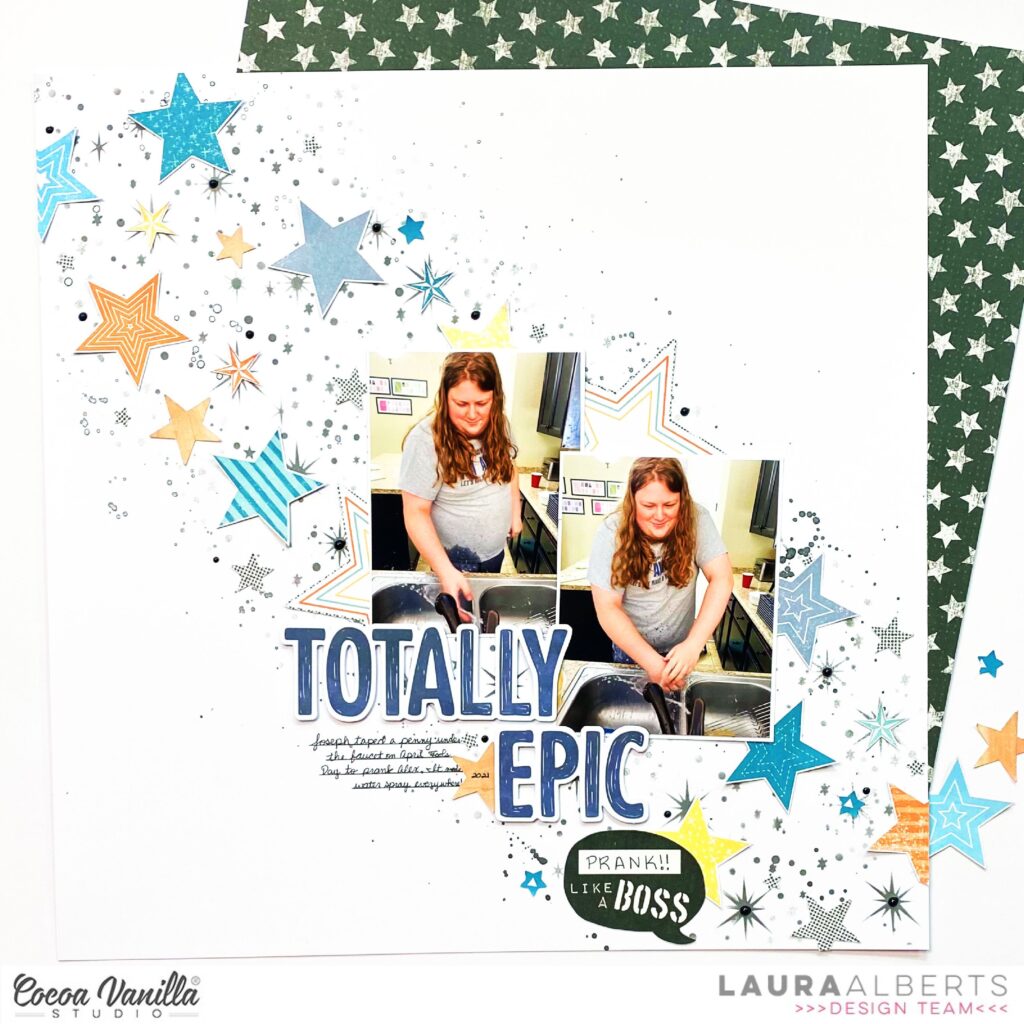
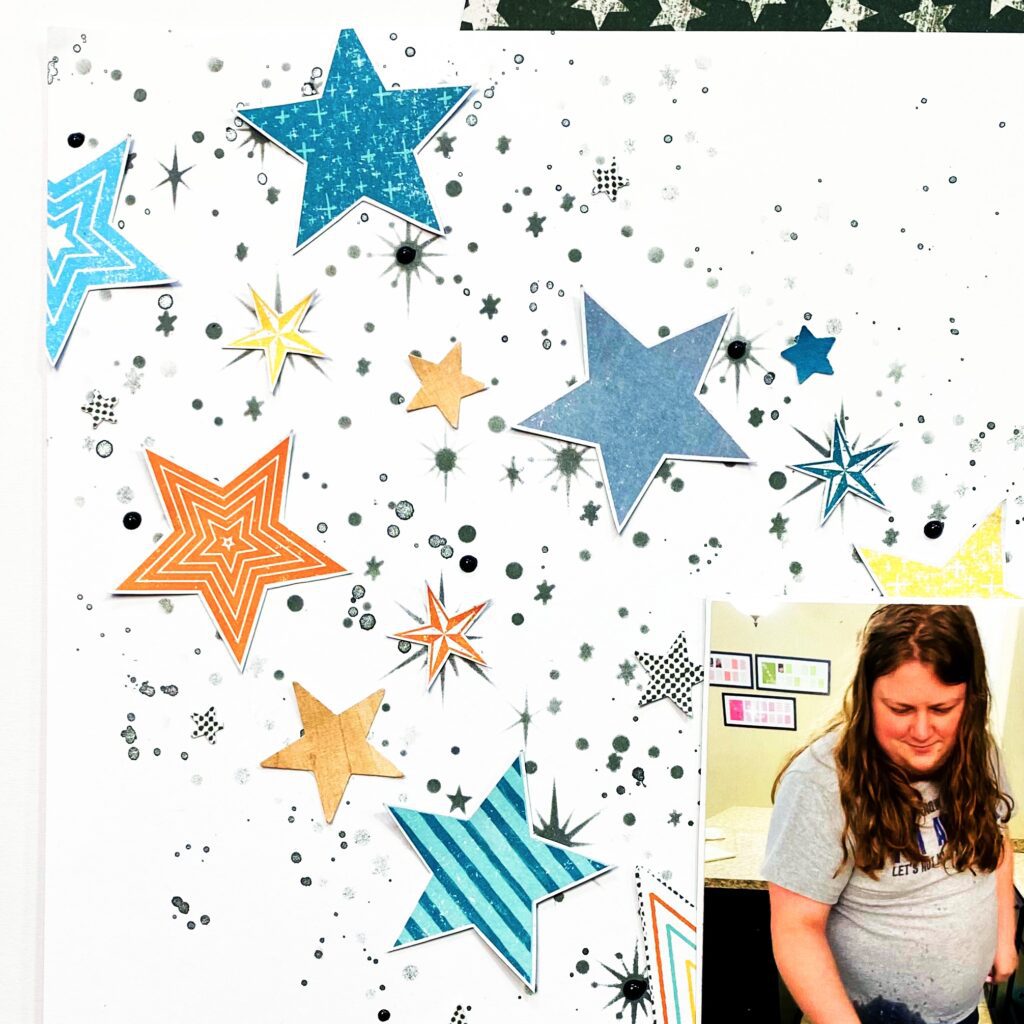
Hey y’all! Laura Alberts back with a brilliant star-filled layout finished off the last of the You Rock collection in my stash! Absolutely adored this boy collection and it was perfect to showcase these photos of my oldest son being epically pranked by his little brother. Inspired by this month’s mood board, I started this one with grey ink stenciling in the background and then silver watercolor splatters. This created the base for my layout and allowed me to follow that path when adding these fussy cut stars.
The title is from the new No Limits cardstock titles and I paired it with this “Like a Boss” ephemera piece. The larger star behind my photos was one star that I cut in half and tucked behind two sides of the photos. This pieces was in the cut-apart paper from You Rock and I’d been hoarding it throughout the whole collection! So satisfying to see that piece make it onto a layout!
To finish this layout off, I added black Nuvo drops in the centers of the largest inked stars as well as in random places around my stars. This detail really brings that black from the ‘Like a Boss’ into the rest of the layout. The tiny stars are all punched from scraps or fussy cut from the cut-apart. One of the best things about Cocoa Vanilla Studio collections is how versatile the papers are. Even at the end, I can use every last little scrap to keep making pages! I love that!
If you’d like to see how ‘Totally Epic Prank’ came together, check out the process video below! I hope this layout inspires you to dig out your inks and try a bit of stenciling on your next layout.
Hi Cocoa Vanilla Studio fans! Danni here with another layout featuring the fabulous new No Limits collection.
This time I chose to use the A5 paper stack and my hexagon punch to play with some geometric patterns. I punched out a handful of hexagons from my favourite papers.
I started with white card stock as a base and added some clear gesso to prep the paper for some wet mixed media painting. Once that dried, I added some colour with some hybrid inks, watercolours and white acrylic ink.
Next, I took my punched hexagons and added some extra detail with fineliner pens and some hand-stitched chain stitch around the edges. I arranged them at the top and bottom of the page. I printed my photo in a hexagon as well using photoshop. The photo went right in the centre of the page, popped up on dimensional foam.
For my title I took the ‘Epic’ piece from the chipboard stickers, then finished it off by fussy cutting the word ‘Fun’ from one of the pocket cards. I love adapting these little cards for fun titles!
To embellish I took a handful of the die cut ephemera and sprinkled them around on top of the hexagons. I followed this with details from the wood buttons and the tiny puffy stickers, plus some tiny words from the accessory stickers.
I love how fun and colourful this one turned out to be! There is a process video linked below on the Cocoa Vanilla Studio YouTube channel if you would like to watch the layout come together. Happy scrapping!
Hello everyone! Today I have another layout made with brand new “No limits” collection. I once again reached out for the photo of my dog son and sent hit to the outer space. Idea for this page was maturing in my head since the day I got the collection. It’s filled with stars and fun cosmos related patterns so I though this kind of page is a “must do”. I didn’t have any specific picture so I had to improvise. This is the kind of page you make just for fun and to turn the idea into a project. Best part is everyone can recreate it becasue there are no special tools required like digital die cutting machine. I am a big fan of my Silhouette Cameo but I know not everyone has one and can be frustrated that some designes require this expensive equipment. That’s why I decided to make this page with handmade rocket. You can of course use cut file to recreate it but you don’t need to.
I cut every element of this page by hand with just a scissors and without any precise measuring and drawing skills. I started with printing my photo and cutting it into circle to establish the size of the rocket. Then I mixed several patterns from A5 Paper Stack and “Spark” paper to create a rocket. I was using one of the rockets from Die Cut Pack as a reference. It’s made out if basic geometrical figures cut by hand. They are not even, lines are wonky, but this is exactly what I was aiming at. After the rocket was finished I took my sewing machine and added some stitching of the edges for even more texture. You can replace them by fals stitches made with white gel pen.
I ended up cutting my dog out of the background and placing him in the round frame backed with piece of acetate creating a rocket window. I decided that the background in the photo was just too distracting. Word “epic” from Chipboard Stickers Pad became the name of the spaceship.
“Eclipse” paper is a perfect background for the outer space adventure! I places my rocket over it and added few wonky planets cut by hand here and there. Next step was to add title. It’s made with a set of Thickers in matching colors. My doggo is for sure out of this world! You can also add some other “space” related titles like “Take me to the moon”, “You are my moon, my sun and all of the stars” and probably few more. I finished my composition by adding few stars from Die Cut pack along and super cute puffy stars and planets from Puffy Stickers pack. Three wooden buttons add great texture. White splatters create make it all look even more like a space.
If you want to learn how this page was made, I recorded a process video for you!
I hope you will enjoy watching my Laika in the rocket.
That is all for today. Thank you so much for staying with me and see in again in two weeks!
Hi everyone, I’m so happy to be back sharing another creation with the amazing new No Limits collection!! I decided to document my teen son’s first day of school photos for 2022, and yes he gave me full permission to share these photos yay! For layout I’m using one of my favourite papers from the collection called Eclipse. The B side is a cut apart sheet which I just had to use as a full sheet because I love how the patterns look together!
I decided to create a pocket-style page, but without the pockets. In order to break up the different rectangles I machine stitched in black thread intentionally uneven. I stitched two rows close together along each of the lines.
I had taken three photos of Sam at home before he walked to school. I loved that I was able to use them all, and backed each of them with papers from the A5 Paper Stack. Rather than stick within the confines of each rectangle, I decided to add interest by going over the lines.
I embellished with a mix of Die Cut Ephemera, Accessory Stickers, Chipboard Stickers, Wood Buttons, and Puffy Stickers. I had so much fun deciding what to put where!
For my journaling I used a Pocket Card (which I fussy cut shown in the photo above) and a journaling spot from the Die Cut Ephemera. I added black machine stitching on them for extra interest and texture.
For my title I used a word from the Die Cut Titles paired with a word from the Chipboard Stickers. I love the two different textures together.
I created a process video which you can watch below.
I hope I’ve inspired you to scrapbook your teens with this stunning collection.
Welcome and so happy to see you on the Cocoa Vanilla blog today! It’s Josefine here and I’m sharing a new layout with you today. I got to work with the amazing collection “No Limits. I am so surprised by this stunning boys collection. I really love the color combinations and the cool vibe!
I grab a 12×12 watercolor paper and choose three colors of distress oxide. The colors I used are, faded jeans, mustard seed and spiced marmalade. I placed an ink pad on my white background and make a horizontal line. I do this with all three colors. Then I take a brush and blend the colors with each other. I splash some more with the colors and water and then let it dry by air. By splashing with water and then dabbing it dry with a piece of kitchen paper you create a cool water color effect.
I use a cutfile by Paige Evans called “Fantastic” as part of my title. I cut out the cutfile with my Cricut Maker and backed it with design paper. I color the alphas with the distress oxide “faded jeans” and then I stitch them with blue sewing thread on my cutfile. The stitch details give my layout more dimensions.
I use a cutfile by Paige Evans called “Fantastic” as part of my title. I cut out the cutfile with my Cricut Maker and backed it with design paper. I color the alphas with the distress oxide “faded jeans” and then I stitch them with blue sewing thread on my cutfile. The stitch details give my layout more dimensions.
I cut pattern paper to size and placed it behind the photo of my son with his cool looking face. On top of the photo, I placed a frame from the Die-cuts elements figures. I select some more figures and make a cluster on the right side of the photo. Some die-cuts I give a blue stitching details.
I cut a few more stars from the fabulous pattern paper and spread them around the layout. I use another second cutfile from Paige Evans “Clouds” and use one cloud I back it with pattern paper, stitch some details with the blue sewing thread and place it behind the picture. I placed a few more puffy stars and planets here and there and finally I give my layout some white splatter with white gesso.
I hope I was able to inspire you with this boys layout and give you some new ideas. Of course, I hope to see you back here on the blog next time with a new project! Can’t wait to see your beautiful projects on the Cocoa Vanilla FB groep! I wish you a very happy and crafty day friends!
Hello scrappy friends! It’s Kylie with you today and I am SO excited because I am sharing my very first layout created with the new ‘NO LIMITS” collection. I have always been a HUGE fan of all of Zoe’s boy themed collections and this one is of no exception! Love it. I was really inspired by the cute rocket ships in the ephemera pack which reminded me that I had a perfect photo I could scrap with this theme. A fun Rocket cut file by Cut To You was my centrepiece and I wanted to combine lots of colour.
The STARDUST paper was selected as my main background page and since I’m always obsessed with wood grain papers, I chose the BIG BANG paper to create a frame. This was done by cutting it down to 11″x 11″ and removing the centre with my trimming board, leaving a 1″ wide border.It was adhered centred on my page and I then added a 8″x 8″ square of LATITUDE paper.
The A5 paper stack is always my go-to when backing cut files. I prefer to use the smaller sheets rather than cut into my 12″x 12″ papers. Once I had backed my cute rocket, it was adhered to the background with foam adhesive squares.
I cut a 4.25″x 4.25″ photo mat from a piece of paper from the A5 paper stack. My photo was trimmed down to 4″x 4″ before being adhered over the photo mat and onto my layout. I was particularly drawn to the chipboard stickers for this page and added the ‘YOU’RE AWESOME’ sticker title below my photo as well as a few stars for balance. To finish my page I added some sub-quote phrases from the sticker sheet too.
Thanks so much for stopping by the blog today and seeing my first layout created with the ‘NO LIMITS’ collection. I hope you liked it!
It’s Tarrah back with you today to share my second layout using the awesome, new No Limits collection! I absolutely LOVE the dark papers in this collection, I love how the white cardstock cut file really pops against the dark paper.
The cut file I have used is from CUT to YOU, I cut it out of white cardstock and backed the ‘World’ word with one of the multi stripe rainbow papers from the A5 paper stack. The reason I picked the multi stripe rainbow paper was so there was some colours added amongst the white and the dark. Once the word was backed I added craft foam underneath the entire cut file and adhered it to the background paper. For the thin words, I did have to add super small pieces of craft foam so that it was not visible on the layout. It really helps to create a page when you add title cut files, it more or less helps determine where everything else can go on the layout.
The photo I am documenting is of myself and my family printed in black and white so that it matched the page perfectly. I layered one of the 3′ x 4′ journaling cards underneath and also one of the die-cut tags from the ephemera pack, I added some craft foam underneath the photo and placed it to the right of the ‘You Are My’ on the cut file. I added some twine in the hole at the top of the tag. At the bottom right corner, I created a small cluster of embellishments here to create a visual triangle with the other 2 clusters I also added to the page. This cluster consists of the circle journal spot die-cut, an arrow die-cut and a star die-cut. I also added one of the gorgeous wood epoxy buttons and a star puffy sticker too. I stamped the date stamp also. Up in the top right corner of my photo I placed a phrase Accessory sticker. I added a few more of the Accessory stickers around the page to help tell my story as well.
To the left of the word ‘World’ I created another embellishment cluster, this time placing a globe die-cut using foam tape, another star die-cut and a star puffy sticker too. Below the cut file, I also placed the ‘The Original + The Best’ die-cut piece and some more stars in both chipboard form and puffy sticker form. Above the cut file title I added the third cluster of embellishments that included some die-cuts, some chipboard and puffy sticker stars and a couple more phrase stickers from the Accessory Sticker sheet.
Above my photo I tucked in one of the large die-cut stars and added one of the chipboard stars in the centre. Once I have added all of the embellishments I think my page needs, I take a step back and give my page a look from a few different angles to make sure I am happy with it, this is when I might opt for another small embellishment in a particular spot or I think about what else my page may need. I usually do not go too over board though and in this case it was a matter of sprinkling some white mist to finish off.
Thank you so much for stopping by the Cocoa Vanilla Studio blog today! I hope you enjoyed my layout as much as I enjoyed creating it?!
Make sure you get your hands on this amazing collection for yourself to create with!
I used the beautiful DayDream collection for this sweet page of my dog Fiona sleeping like an angel!
I had the idea of creating mini envelopes with my Cutting Machine in different patterned papers from the 6×8 Paper Stack. I adhered small Velcro pieces to the second and third envelope so that they could open and close easily. I let the top one open and placed a tag with my journaling in it. I added a Puffy Heart on the other two.
My background paper is the gorgeous Over The Rainbow patterned paper.
I teared a big chunk of thick white cardstock for the center of the page and two strips of the Happy Place paper beneath it.
I mounted my photo on foam adhesive and created a beautiful floral cluster on the bottom of the photo and envelopes. The flowers are from the Die Cut Ephemera pack, and cut out of the Garden Variety paper.
I added a Flair Button and fussy cut butterflies from the All Aflutter paper.












 Hey crafty Paperlovers,
 I use a cutfile by Paige Evans called “Fantastic” as part of my title. I cut out the cutfile with my Cricut Maker and backed it with design paper. I color the alphas with the distress oxide “faded jeans” and then I stitch them with blue sewing thread on my cutfile. The stitch details give my layout more dimensions.
 I cut a few more stars from the fabulous pattern paper and spread them around the layout. I use another second cutfile from Paige Evans “Clouds” and use one cloud I back it with pattern paper, stitch some details with the blue sewing thread and place it behind the picture. I placed a few more puffy stars and planets here and there and finally I give my layout some white splatter with white gesso.